Vapor 설치
brew install vapor
Vapor 설치 확인
vapor --help
기본 새 project 생성
vapor new hello -n # -n flag 는 모든 질문에 no라 답해서 bare bone template 을 제공
Build & Run
open Package.swift # Xcode 로 프로젝트 열기
My Mac 으로 target 설정 후 run 하면 Console 에 완료됐다는 로그 확인 가능. LocalHost 에서 확인 가능
[ INFO ] Server starting on http://127.0.0.1:8080
Project Structure
.
├── Public
├── Sources
│   ├── App
│   │   ├── Controllers
│   │   ├── Migrations
│   │   ├── Models
│   │   ├── configure.swift
│   │   ├── entrypoint.swift
│   │   └── routes.swift
│
├── Tests
│   └── AppTests
└── Package.swift
Public
FileMiddleware 가 활성화 된 경우 public file 을 포함함. 이미지, style sheet, browser script 포함.
configure.swift 에 FileMiddleware 을 활성화해야 public file serve 가능
// Serves files from `Public/` directory
let fileMiddleware = FileMiddleware(
    publicDirectory: app.directory.publicDirectory
)
app.middleware.use(fileMiddleware)
Sources
모든 Swift source 포함. App 폴더는 SPM 처럼 package 의 모듈을 나타냄
App
모든 app logic
Controllers
App logic grouping 하기 위한 수단. 많은 controller 는 request 를 받아서 response 를 return 하는 함수를 가짐
Migrations
Fluent 를 사용할 경우 database migration 을 하는 곳
Models
Fluent Model 의 Content struct 를 저장하기에 좋은 곳
configure.swift
configure(_:) function 포함. Application 을 구성하기 위해 entrypoint.swift 에서 호출됨.
route, database, provider 같은 서비스를 등록해야 하는 곳
entrypoint.swift
app 이 set up, configure, run 되기 위한 @main entry point
routes.swift
routes(_:) function 포함. configure(_:) 끝에 호출돼서 Application 에 route 를 등록하기 위함
Xcode
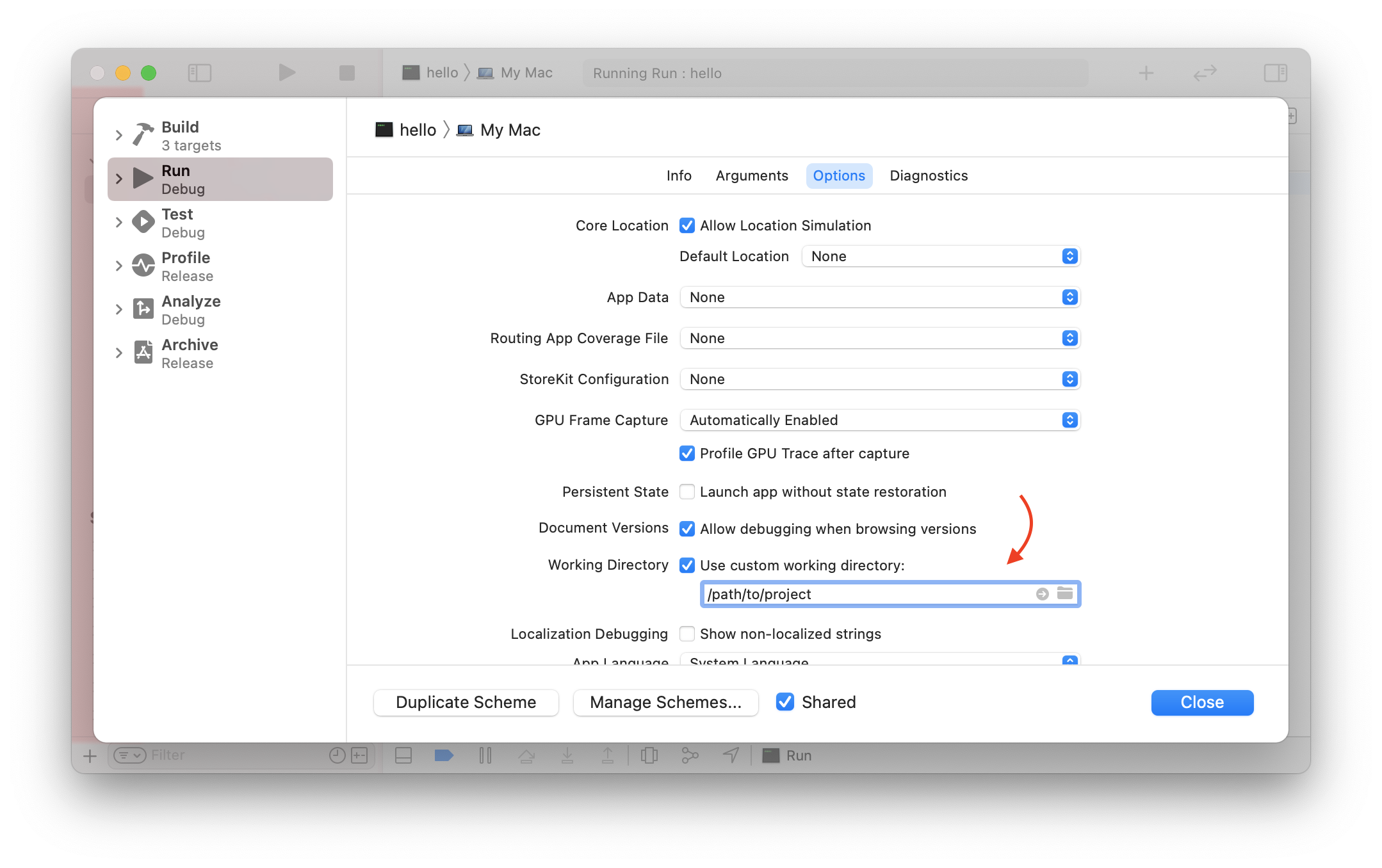
Xcode 로 실행할 경우 Custom working directory 를 설정
Xcode 는 default 로 DerivedData folder 에서 project 를 실행하기 때문에 프로젝트 폴더 내 .env, Public 같은 파일/폴더를 찾을 수 없음
Xcode > Edit Scheme > Options > Working directory > use custom working directory 를 프로젝트 경로로 설정
Goal : Add Get Routes returning JSON
Routing
Routing : incoming request 에 대한 적절한 request handler 를 찾기 위한 process.
GET /hello/vapor HTTP/1.1
host: vapor.codes
content-length: 0
URL /hello/vapor 에 GET HTTP request 를 한 것. 아래 url 을 칠 경우 browser 가 HTTP 요청을 보내게 됨
http://vapor.codes/hello/vapor
HTTP Method
| Method | CRUD |
|---|---|
GET |
Read |
POST |
Create |
PUT |
Replace |
PATCH |
Update |
DELETE |
Delete |
Request Path
HTTP method + request 의 URI 가 붙음. + header + body (Get 요청은 없음)
Request URI 는 / 로 시작하는 path 와 ? 뒤에 붙은 optional query 로 이루어짐. HTTP method, path 를 사용해서 Vapor 가 request 를 route 함
Router Methods
모든 HTTP method 는 Application 의 method 로 존재.
app.get("hello", "vapor") { req in
    return "Hello, vapor!"
}

// or
app.on(.GET, "hello", "vapor") { ... }
route 가 등록되면 위 request 는 아래의 response 를 받음
HTTP/1.1 200 OK
content-length: 13
content-type: text/plain; charset=utf-8

Hello, vapor!
Route Parameters
Path 를 dynamic 하게 만들 수 있음. 위에서 /vapor 로 하드코딩 되어 있는걸 /hello/<any name> 과 같이 동적으로 만들 수 있음
app.get("hello", ":name") { req -> String in
    let name = req.parameters.get("name")!
    return "Hello, \(name)!"
}
prefix : 를 써서 router 에게 dynamic component 임을 알려줌. req.parameters 를 써서 string 의 값에 접근 가능.
Routes
Route : 주어진 HTTP method, URI path 에 대한 request handler 를 명시함. metatdata 를 추가로 저장할 수도 있음
Methods
Routes 는 Application 에 바로 등록될 수 있음. HTTP method helper 사용.
// responds to GET /foo/bar/baz
app.get("foo", "bar", "baz") { req in
    ...
}
- Supported route helper methods
- get
- post
- patch
- put
- delete
추가로 on function 도 있음. input parameter 로 HTTP method 를 받음
// responds to OPTIONS /foo/bar/baz
app.on(.OPTIONS, "foo", "bar", "baz") { req in
    ...
}
Route handler 는 ResponseEncodable 인 것을 return 하는 것을 지원함.
ResponseEncodable 이 포함하는 것들
Contentasyncclosure- future value 가
ResponseEncodable인EventLoopFuture
app.get("foo") { req -> String in
    return "bar"
}
Path Component
각 route registration 은 PathComponent type 의 variadic list 를 받음. PathComponent 는 string literal 로 생성할 수 있고 총 4가지 case 가 있음
- Constant (
foo) - Parameter (
:foo) - Anything (
*) - Catchall (
**)
Constant
Static route component. 오직 정확히 matching 하는 case 만 허용됨
// responds to GET /foo/bar/baz
app.get("foo", "bar", "baz") { req in
    ...
}
Parameter
Dynamic route component. 이 위치에 오는 string 은 모두 허용됨. : prefix 가 붙고, : 뒤에 오는 string 은 parameter 이름이 됨. 이름을 통해 request 에서 parameter 들의 값을 가져올 수 있음
// responds to GET /foo/bar/baz
// responds to GET /foo/qux/baz
// ...
app.get("foo", ":bar", "baz") { req in
    ...
}
Anything
Value 의 값이 필요 없는 경우에 사용 가능
// responds to GET /foo/bar/baz
// responds to GET /foo/qux/baz
// ...
app.get("foo", "*", "baz") { req in
    ...
}
Catchall
하나 이상의 component 를 matching 하는 dynamic route component. ** 를 사용. 해당 위치, 이후 위치에 나오는 어떤 string 이든 다 매칭됨
// responds to GET /foo/bar
// responds to GET /foo/bar/baz
// ...
app.get("foo", "**") { req in
    ...
}
Parameters
Parameter path component 를 사용할 경우 해당 URI 의 값은 req.parameters 에 저장됨
// responds to GET /hello/foo
// responds to GET /hello/bar
// ...
app.get("hello", ":name") { req -> String in
    let name = req.parameters.get("name")! // 무조건 nil 이 아닌 값이 떨어질 것임을 확신할 수 있음
    return "Hello, \(name)!"
}
req.parameters.get 은 parameter 를 자동으로 LosslessStringConvertible type 으로 casting 하는 것을 지원함
// responds to GET /number/42
// responds to GET /number/1337
// ...
app.get("number", ":x") { req -> String in
    guard let int = req.parameters.get("x", as: Int.self) else {
        throw Abort(.badRequest)
    }
    return "\(int) is a great number"
}
Catchall ** 로 매칭된 URI 값들은 [String] 형태로 req.parameters 에 저장됨. req.parameters.getCatchall 로 접근 가능
// responds to GET /hello/foo
// responds to GET /hello/foo/bar
// ...
app.get("hello", "**") { req -> String in
    let name = req.parameters.getCatchall().joined(separator: " ")
    return "Hello, \(name)!"
}
Body Streaming
on method 를 사용해서 route 를 register 할 경우, request body 가 어떻게 처리되어야 하는지를 명시할 수 있음. 기본적으로 request body 는 handler 에 의해 호출되기 전에 메모리에 수집됨. 이는 application 이 incoming request 를 비동기적으로 읽어도 request content 를 동기적으로 decoding 할 수 있게 해주기 때문에 유용함
기본적으로 Vapor 는 body collection 을 16KB 로 제한함. app.routes 에서 설정 가능
// Increases the streaming body collection limit to 500kb
app.routes.defaultMaxBodySize = "500kb"
만약 streaming body 가 limit 을 넘을 경우 413 Payload Too Large error 가 던져짐
특정 하나의 route 에 대한 request body collection 전략을 구성하고 싶은 경우 body 파라미터 사용
// Collects streaming bodies (up to 1mb in size) before calling this route.
app.on(.POST, "listings", body: .collect(maxSize: "1mb")) { req in
    // Handle request.
}
만약 maxSize 가 collection 에 전달된 경우 해당 route 에 대한 기본 application default 를 override 함.
파일 업로드 같은 큰 request 의 경우 request body 를 buffer 에 모으는 것은 시스템 메모리에 부담을 주는 것일 수 있음. Request body 가 collect 되는 것을 막으려면 stream 전략을 사용.
// Request body will not be collected into a buffer.
app.on(.POST, "upload", body: .stream) { req in
    ...
}
이 경우 request body 가 stream 된 경우, req.body.data 가 nil 이 떨어짐. req.body.drain 을 써서 route 에 전달된 각 chunk 를 처리해야 함.
Case Insensitive Routing
Viewing Routes
Metadata
Route Groups
Path Prefix
Middleware
Redirections
Content
Vapor 의 content API 는 HTTP 메세지에서 Codable struct 를 쉽게 encode/decode 할 수 있게 해줌. Default 로 JSON 인코딩이 사용됨.