String : character 들의 series
String Literals
큰 따옴표로 감싸진 문자열들
let someString = "Some string literal value"
Multiline String Literals
큰 따옴표 세 개로 감싸서 여러 줄 string literal 을 만들 수 있음
let feeling = """
I want to go home.

Right now.
"""
Multiline string literal 안에 line break 를 포함한다면 문자열에 포함되게 됨. 만약 줄바꿈을 해서 가독성을 높이고 싶지만 실제로 문자열에 포함되는 것을 원하지 않을 때 해당 줄 끝에 backslash \ 를 붙이면 됨
let softWrappedQuotation = """
The White Rabbit put on his spectacles.  "Where shall I begin, \
please your Majesty?" he asked.

"Begin at the beginning," the King said gravely, "and go on \
till you come to the end; then stop."
"""
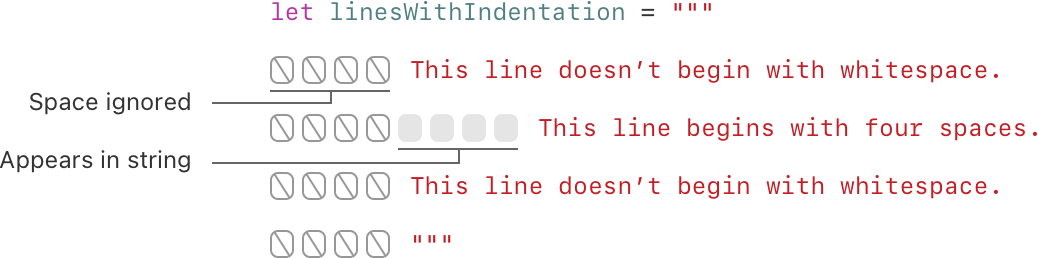
Multiline string 은 indent 될 수 있음. 끝부분의 """ 전의 whitespace 는 다른 줄의 어떤 whitespace 를 무시할 것인지 Swift 에게 알려줌.
Special Characters in String Literals
String literal 은 다음의 특별한 문자를 포함할 수 있음
\0(null),\\(backslash),\t(horizontal tab),\n(line feed),\r(carriage return),\"(double quotation mark),\'(single quotation mark)- 임의의 Unicode scalar 값 (
\u{n}). n 은 16 진수 숫자임
let wiseWords = "\"Imagination is more important than knowledge\" - Einstein"
// "Imagination is more important than knowledge" - Einstein
let dollarSign = "\u{24}"        // $,  Unicode scalar U+0024
let blackHeart = "\u{2665}"      // ♥,  Unicode scalar U+2665
let sparklingHeart = "\u{1F496}" // 💖, Unicode scalar U+1F496

let threeDoubleQuotationMarks = """
Escaping the first quotation mark \""" // 첫 번째 큰따옴표를 처리하는 방법
Escaping all three quotation marks \"\"\" // 큰따옴표 세 개를 모두 처리하는 방법
"""
Extended String Delimiters
특별한 문자를 그들의 효과 발동 없이 문자열에 포함시키기 위해 extended delimiter 를 사용할 수 있음.
큰 따옴표 " 와 숫자 표시 # 로 감쌈. Multiline string literal 에도 붙일 수 있음
특별한 문자의 효과를 보고 싶으면 escape 문자 \ 뒤에 # 를 붙이면 됨.
let example = #"Line 1\nLine 2"# // \n 문자열 자체를 출력함

let example2 = #"Line 1\#nLine 2"# // 줄바꿈
Initializing an Empty String
String literal 을 할당하거나 String initializer 를 사용.
문자열이 비어있는지는 isEmpty property 를 사용해서 확인 가능
var emptyString = ""               // empty string literal
var anotherEmptyString = String()  // initializer syntax
// these two strings are both empty, and are equivalent to each other

if emptyString.isEmpty {
    print("Nothing to see here")
}
// Prints "Nothing to see here".
String Mutability
variable 에 할당할 경우 수정될 수 있고 constant 에 할당할 경우 수정할 수 없음
var variableString = "Horse"
variableString += " and carriage"
// variableString is now "Horse and carriage"

let constantString = "Highlander"
constantString += " and another Highlander"
// ❗️ this reports a compile-time error - a constant string cannot be modified
Obj-c 에서는 문자열이 수정될 수 있냐 없냐는 NSString / NSMutableString 을 선택하느냐에 따라 달랐음
Strings are Value Types
String 은 value type. 새로운 String 을 생성할 경우 해당 값은 함수/메서드에 전달되거나 상수/변수에 할당될 때 복사됨. 이미 존재하는 String 의 새로운 복사본이 생성되고 전달/할당됨
Copy-by-default 동작은 함수/메서드가 String 을 전달할 때, 그것의 origin 과는 상관 없이 내가 나만의 String 값을 가지고 있는 것을 보장함.
Swift compiler 는 string 의 사용량을 최적화해서 실제로 필요한 경우에만 복사를 함.
Working with Characters
for-in loop 를 사용해서 문자열 내 개별 Character 에 접근할 수 있음
for character in "Dog!🐶" {
    print(character)
}
// D
// o
// g
// !
// 🐶
하나의 문자로 이루어진 string literal 과 Character type annotation 을 통해 Character 를 생성할 수 있음.
let exclamationMark: Character = "!"
Character 배열을 String initializer 에 전달해서 문자열을 만들 수 있음
let catCharacters: [Character] = ["C", "a", "t", "!", "🐱"]
let catString = String(catCharacters)
print(catString)
// Prints "Cat!🐱".
Concatenating Strings and Characters
addition operator + 를 사용해서 concatenate 할 수 있음. addition assignment operator += 를 사용해서도 가능
String 의 append() 메서드를 통해 Character 를 추가할 수 있음
let string1 = "hello"
let string2 = " there"
var welcome = string1 + string2
// welcome now equals "hello there"

var instruction = "look over"
instruction += string2 // instruction now equals "look over there"

let exclamationMark: Character = "!"
welcome.append(exclamationMark) // welcome now equals "hello there!"
multiline string literal 의 경우 line break 에 유의해서 사용
let badStart = """
    one
    two
    """
let end = """
    three
    """
print(badStart + end)
// Prints two lines:
// one
// twothree


let goodStart = """
    one
    two

    """
print(goodStart + end)
// Prints three lines:
// one
// two
// three
String Interpolation
String literal 안에 상수, 변수, literal, 표현들을 포함해서 String 을 만드는 방법. Backlash prefix 와 함께 괄호로 감싸서 string literal 안에 넣으면 됨.
Extended string delimiter 를 쓰는 경우 값 대신 문자열 자체가 표시됨
let multiplier = 3
let message = "\(multiplier) times 2.5 is \(Double(multiplier) * 2.5)"
// message is "3 times 2.5 is 7.5"

print(#"Write an interpolated string in Swift using \(multiplier)."#) // Prints "Write an interpolated string in Swift using \(multiplier)."

print(#"6 times 7 is \#(6 * 7)."#) // Prints "6 times 7 is 42."
괄호 안에는 backslash \, carriage return, line feed 가 포함될 수 없음
Unicode
여러 writing system 에서 text 를 encode, represent, process 하기 위한 국제 표준. 어떠한 문자든 표준화된 형식으로 표현하고 해당 문자를 텍스트 파일이나 웹페이지에서 읽고 쓸 수 있게 해줌.
String, Character 는 완전히 Unicode-compliant (Unicode 표준을 따름)
Unicode Scalar Values
String 은 Unicode scalar value 를 기반으로 함.
Unicode scalar value : 문자/modifier 를 나타내는 unique 한 21-bit 숫자. 모든 값이 문자에 할당되어 있지는 않고 미래에 할당되기 위해 남겨져 있거나 UTF-16 encoding 을 위해 예약되어 있는 값들임.
e.g. U+0061 : Latin small letter A “a”
e.g. U+1F425 : Front-facing baby chick “🐥”
특정 문자에 할당된 scalar 값은 위와 같이 이름이 있음
Extended Grapheme Clusters
모든 Character 인스턴스는 single extended grapheme cluster 를 표현함
Extended grapheme cluster: 하나 이상의 Unicode scalar 가 모인 sequence 로 사람이 읽을 수 있는 문자를 생성함
é 의 경우 두 가지로 표현 가능
- single Unicode scalar :
U+00E9 - pair of scalars :
U+0065(e) 뒤에U+0301이 붙어서 표현됨
두 경우 모두 é 는 extended grapheme cluster 를 표현하는 single Swift Character 값으로 표현됨
let eAcute: Character = "\u{E9}"                         // é. 하나의 scalar
let combinedEAcute: Character = "\u{65}\u{301}"          // e followed by ́
// eAcute is é, combinedEAcute is é. 두 개의 scalar의 cluster
Extended grapheme cluster 는 한글과 같이 복잡한 script character 를 유연하게 표현할 수 있게 해줌.
let precomposed: Character = "\u{D55C}"                  // 한
let decomposed: Character = "\u{1112}\u{1161}\u{11AB}"   // ᄒ, ᅡ, ᆫ
// precomposed is 한, decomposed is 한
Enclosing marks 도 표현 가능. (문자를 원으로 감싼거)
let enclosedEAcute: Character = "\u{E9}\u{20DD}"
// enclosedEAcute is é⃝
Counting Characters
count property 를 통해 문자열 내 문자의 개수를 얻을 수 있음
let unusualMenagerie = "Koala 🐨, Snail 🐌, Penguin 🐧, Dromedary 🐪"
print("unusualMenagerie has \(unusualMenagerie.count) characters")
// Prints "unusualMenagerie has 40 characters".
Swift의 extended grapheme cluster 때문에 string concatenation 이나 수정을 할 경우 항상 string 내 문자의 개수가 변하지는 않음. 아래의 경우 extended grapheme cluster 를 통해 concat 를 해도 문자 개수에 변함이 없음
var word = "cafe"
print("the number of characters in \(word) is \(word.count)")
// Prints "the number of characters in cafe is 4".


word += "\u{301}"    // COMBINING ACUTE ACCENT, U+0301


print("the number of characters in \(word) is \(word.count)")
// Prints "the number of characters in café is 4".
Extended grapheme cluster 는 여러 Unicode scalar 로 구성될 수 있는데, 같은 문자라도 다른 메모리 공간을 차지할 수 있음. 따라서 문자열 내 문자의 개수는 string 을 iterate 해서 각 grapheme cluster 간의 경계를 파악해야 할 수 있음. 매우 긴 문자열을 갖고 작업을 할 경우 count property 는 전체 string 을 iterate 해야만 알 수 있다는 것에 주의해야 함.
Accessing and Modifying a String
Method / property / subscript syntax 를 통해 접근하고 수정
String Indices
String 은 associated type String.Index 를 갖고 있음. String.Index 는 문자열 내 각 Character 의 위치를 나타냄
문자마다 다른 메모리 공간이 필요하기 때문에 특정 Character 가 어떤 위치에 있는지를 확인하려면 각 unicode scalar 를 iterate 해봐야 함. 이 때문에 Swift 의 문자열은 int 값으로 인덱싱될 수 없음
startIndexproperty : 첫 번째Character의 위치에 접근 가능endIndexproperty : 마지막Character다음의 위치. string 의 subscript 의 argument 에 집어넣으면 안됨index(before:)/index(after:)메서드 : 주어진 index 로 접근index(_:offsetBy:)메서드 : 주어진 index 보다 특정 index 만큼 떨어진 곳에 접근- subscript : 특정 index 에 있는
Character에 접근 indicesproperty : 문자열 내 모든 문자들의 index 에 접근
빈 문자열의 경우 startIndex == endIndex
let greeting = "Guten Tag!"
greeting[greeting.startIndex]
// G
greeting[greeting.index(before: greeting.endIndex)]
// !
greeting[greeting.index(after: greeting.startIndex)]
// u
let index = greeting.index(greeting.startIndex, offsetBy: 7)
greeting[index]
// a

for index in greeting.indices {
    print("\(greeting[index]) ", terminator: "")
}
// Prints "G u t e n   T a g ! ".
Inserting and Removing
insert(_:at:) 메서드를 사용해서 특정 index 에 문자를 삽입할 수 있음.
remove(at:) 메서드를 사용해서 특정 문자를 제거할 수 있음
var welcome = "hello"
welcome.insert("!", at: welcome.endIndex)
// welcome now equals "hello!"

welcome.insert(contentsOf: " there", at: welcome.index(before: welcome.endIndex))
// welcome now equals "hello there!"

welcome.remove(at: welcome.index(before: welcome.endIndex)) // welcome now equals "hello there"
let range = welcome.index(welcome.endIndex, offsetBy: -6)..<welcome.endIndex
welcome.removeSubrange(range) // welcome now equals "hello"
Substrings
Substring 은 string 이 아님. Substring 은 string 에 특정 작업을 하는 짧은 기간동안 사용하기 위함. 더 긴 시간동안 결과를 저장하고 싶으면 substring 을 string 으로 변환
let greeting = "Hello, world!"
let index = greeting.firstIndex(of: ",") ?? greeting.endIndex
let beginning = greeting[..<index]
// beginning is "Hello"

// Convert the result to a String for long-term storage.
let newString = String(beginning)
각 substring 은 substring 을 구성하는 문자들이 저장된 메모리의 region 을 갖고 있음. String, substring 간의 차이는 성능 최적화 측면에서 substring 은 original string 을 저장하기 위해 사용된 메모리의 일부 공간이나 다른 substring 을 저장하기 위해 사용된 메모리의 일부 공간을 재사용할 수 있음. 이는 string 이나 substring 을 수정하지 않는 한 메모리 copy 가 일어나지 않는다는 뜻. Substring 이 짧은 시간 작업에 적합하다고 한 이유도 substring 이 original string 의 메모리를 재사용하기 때문에 substring 이 사용되는 한 original string 전체가 메모리에 유지되어야 하기 때문임.
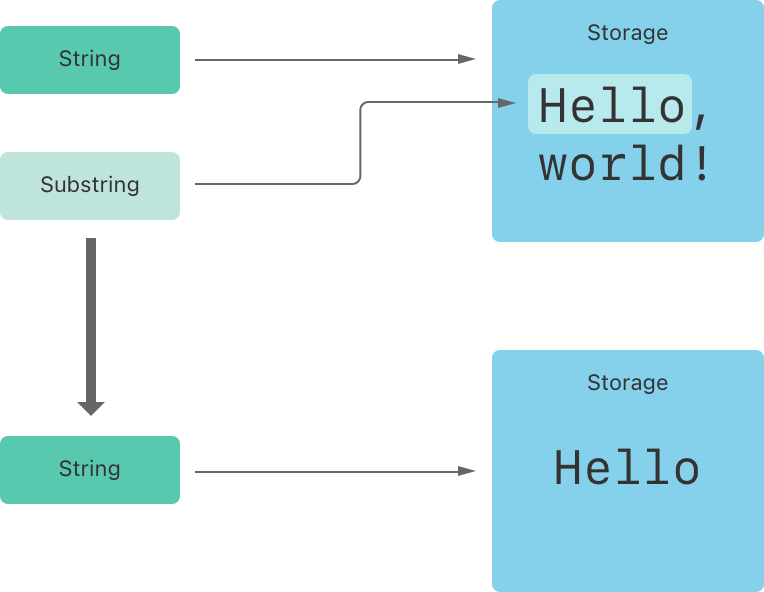
위 코드 예시에서 greeting 은 string 이라 메모리의 공간을 차지하고 있음. beginning 은 substring 이기 때문에 greeting 이 사용하는 메모리를 재사용함. newString 은 string이기 때문에 자신만의 메모리 공간을 차지하고 있음
Comparing Strings
- String & character equality
- Prefix equality
- Suffix equality
String and Character Equality
Equal to == / Not eqaul to != operator 로 확인/
두 string / character 는 그들의 grapheme clusters 가 canonically equivalent 한 경우에 같다고 판단됨.
Canonically equivalent : 다른 unicord scalar 로 구성되어 있어도 같은 의미와 모양을 가질 경우
// "Voulez-vous un café?" using LATIN SMALL LETTER E WITH ACUTE
let eAcuteQuestion = "Voulez-vous un caf\u{E9}?"


// "Voulez-vous un café?" using LATIN SMALL LETTER E and COMBINING ACUTE ACCENT
let combinedEAcuteQuestion = "Voulez-vous un caf\u{65}\u{301}?"


if eAcuteQuestion == combinedEAcuteQuestion {
    print("These two strings are considered equal")
}
// Prints "These two strings are considered equal".
하지만 의미가 같지 않을 경우 모양이 같아도 다르다고 표시됨
let latinCapitalLetterA: Character = "\u{41}" // "A"


let cyrillicCapitalLetterA: Character = "\u{0410}" // "A"


if latinCapitalLetterA != cyrillicCapitalLetterA {
    print("These two characters aren't equivalent.")
}
// Prints "These two characters aren't equivalent."
Prefix and Suffix Equality
hasPrefix(_:), hasSuffix(_:) 메서드. bool 값을 return 함
Unicode Representations of Strings
Unicode 문자열이 텍스트 파일 등에 써질 경우 Unicode scalar 는 여러 Unicode-defined encoding forms 중 하나로 encoding 됨.
각 form 은 문자열을 code unit 이라는 작은 chunk 로 string 을 encode.
- UTF-8 encoding form : 문자열을 8-bit code unit 으로 encode
- UTF-16 encoding form
-
UTF-32 encoding form
utf8property : collection of UTF-8 code unitsutf16property : collection of UTF-16 code unitsunicodeScalarsproperty : collection of 21-bit Unicode scalar value(UTF-32 encoding form 과 같은거) code units
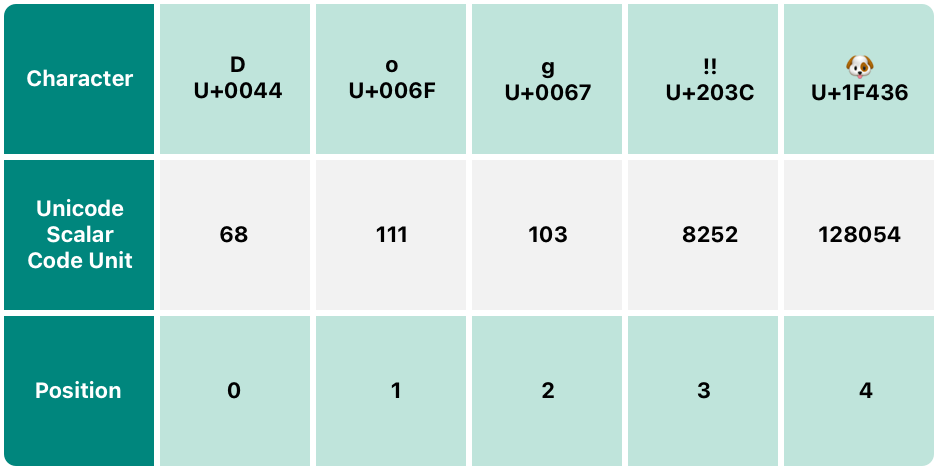
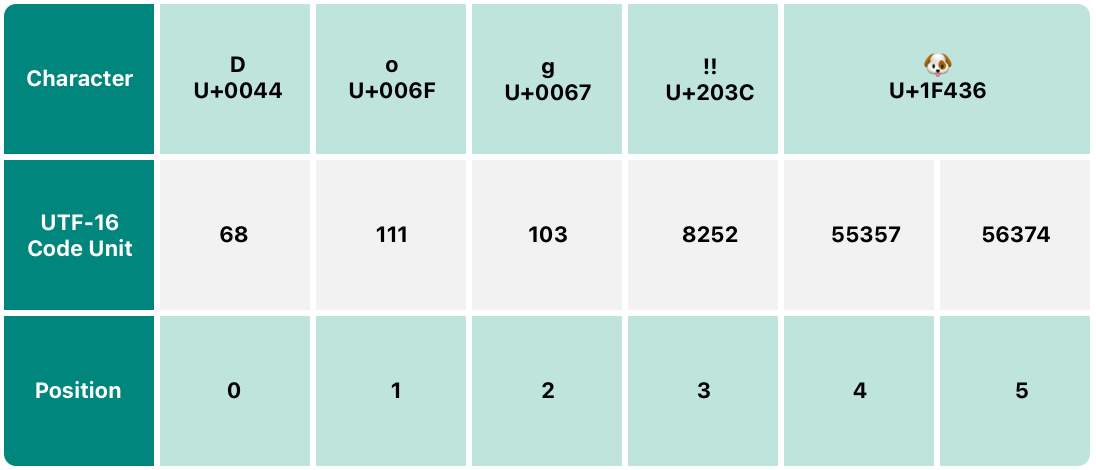
예시 문장 :
let dogString = "Dog‼🐶"
UTF-8 Representation
utf8 property 를 통해 접근 가능. Unsigned 8-bit UInt8 값들의 collection
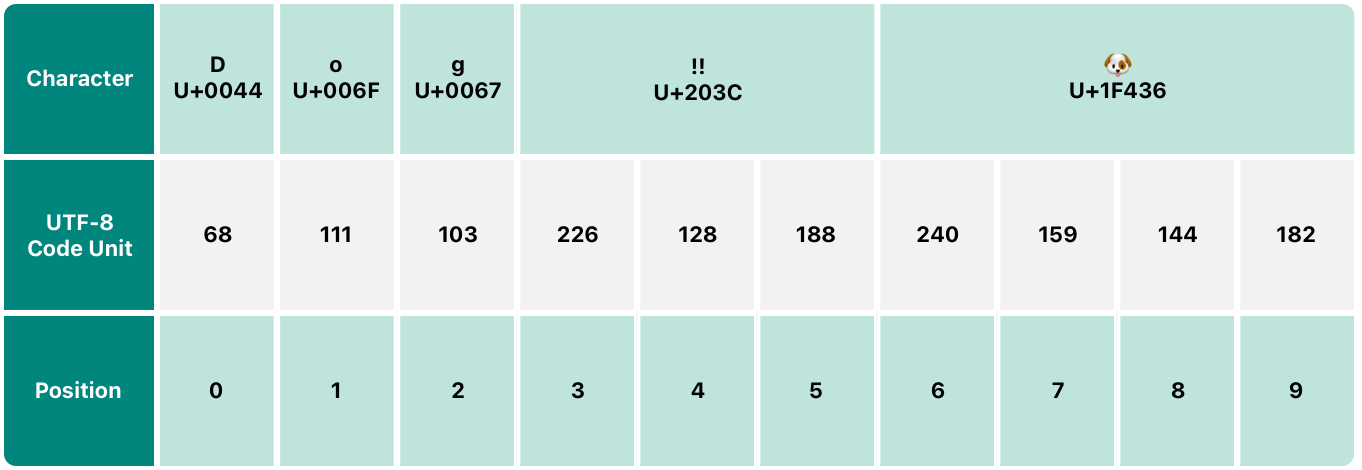
e.g. 226, 128, 188 은 !! 문자의 three-byte UTF-8 표현
for codeUnit in dogString.utf8 {
    print("\(codeUnit) ", terminator: "")
}
print("")
// Prints "68 111 103 226 128 188 240 159 144 182 ".
UTF-16 Representation
utf16 property 를 통해 접근 가능 UInt16 값들의 collection
Unicode Scalar Represenation
unicodeScalars property 를 통해 접근 가능. UInt32 값들의 collection