- Primary Collection types
- array : ordered collections of values
- sets : unordered collections of unique values
- dictionary : unordered collections of key-value associations
Mutability of Collections
Collection 을 변수에 할당하면 mutable, 상수에 할당하면 immutable.
Collection 이 변화가 필요없을 경우 immutable 하게 생성해서 Swift compiler 가 최적화하는데 도움을 줄 수 있음
Arrays
순서가 있는 리스트에 같은 타입의 값들을 저장하는 것. 중복 값이 있을 수 있음
Array Type Shorthand Syntax
Array<Element> / [Element]
Element : 저장하는 값들의 타입
Creating an Empty Array
- Context 가 이미 type 정보를 제공하는 경우 (함수 argument 등) : empty array literal
[] - 명시적인 initializer :
[Int]()
var someInts: [Int] = []
print("someInts is of type [Int] with \(someInts.count) items.")
// Prints "someInts is of type [Int] with 0 items."

var someInts = [Int]() print("someInts is of type [Int] with \(someInts.count) items.")
// Prints "someInts is of type [Int] with 0 items."

// 다시 empty array literal 을 써서 빈 배열 할당 가능
someInts = [] // someInts is now an empty array, but is still of type [Int]
Creating an Array with a Default Value
기본값으로 채워진 특정 크기의 배열을 생성하는 initializer 사용 가능
var threeDoubles = Array(repeating: 0.0, count: 3)
// threeDoubles is of type [Double], and equals [0.0, 0.0, 0.0]
Creating an Array by Adding Two Arrays Together
이미 존재하는 compatible 한 두 배열을 addition operator + 를 통해 더해서 새로운 배열을 만들 수 있고 타입은 더해진 배열에서 추론됨
var anotherThreeDoubles = Array(repeating: 2.5, count: 3)
// anotherThreeDoubles is of type [Double], and equals [2.5, 2.5, 2.5]

var sixDoubles = threeDoubles + anotherThreeDoubles
// sixDoubles is inferred as [Double], and equals [0.0, 0.0, 0.0, 2.5, 2.5, 2.5]
Creating an Array with an Array Literal
Array literal 을 사용. 하나 이상의 값을 array collection 으로 표현하기 위해 쓸 수 있는 간소화된 방법.
[<#value 1#>, <#value 2#>, <#value 3#>]

var shoppingList: [String] = ["Eggs", "Milk"]
// shoppingList has been initialized with two initial items

// swift 의 type inference 로 같은 타입으로 array literal 을 채워서 초기화할 경우 타입 명시 안해도 됨
var shoppingList = ["Eggs", "Milk"]
Accessing and Modifying and Array
Method / property / subscript syntax 를 사용
count: 배열 내 원소의 개수isEmpty:count== 0 인지 확인append(_:): 배열 끝에 새로운 아이템 추가+=: 하나 이상의 아이템을 추가할 때- subscript syntax : index 를 전달해서 특정 index 의 아이템에 접근할 때. index 는 항상 유효해야 하며 그렇지 않은 경우 runtime error 발생.
insert(_:at:): 특정 index 에 아이템을 삽입할 때remove(at:): 특정 index 에 있는 아이템을 삭제할 때removeLast(): 가장 마지막에 있는 아이템을 삭제할 때
print("The shopping list contains \(shoppingList.count) items.")
// Prints "The shopping list contains 2 items."

if shoppingList.isEmpty {
    print("The shopping list is empty.")
} else {
    print("The shopping list isn't empty.")
}
// Prints "The shopping list isn't empty."

shoppingList.append("Flour")
// shoppingList now contains 3 items, and someone is making pancakes

shoppingList += ["Baking Powder"]
// shoppingList now contains 4 items
shoppingList += ["Chocolate Spread", "Cheese", "Butter"]
// shoppingList now contains 7 items

var firstItem = shoppingList[0]
// firstItem is equal to "Eggs"

shoppingList[0] = "Six eggs"
// the first item in the list is now equal to "Six eggs" rather than "Eggs"

shoppingList[4...6] = ["Bananas", "Apples"]
// shoppingList now contains 6 items

shoppingList.insert("Maple Syrup", at: 0)
// shoppingList now contains 7 items
// "Maple Syrup" is now the first item in the list

let mapleSyrup = shoppingList.remove(at: 0)
// the item that was at index 0 has just been removed
// shoppingList now contains 6 items, and no Maple Syrup
// the mapleSyrup constant is now equal to the removed "Maple Syrup" string

let apples = shoppingList.removeLast()
// the last item in the array has just been removed // shoppingList now contains 5 items, and no apples // the apples constant is now equal to the removed "Apples" string
Iterating Over an Array
for-in loop 를 통해 전체 값을 iterate 할 수 있음.
아이템과 함께 index도 필요한 경우 enumerated() 메서드 사용
for item in shoppingList {
    print(item)
}

for (index, value) in shoppingList.enumerated() {
    print("Item \(index + 1): \(value)")
}
// Item 1: Six eggs
// Item 2: Milk
// Item 3: Flour
// Item 4: Baking Powder
// Item 5: Bananas
Sets
정의된 순서 없이 같은 타입의 고유한 값들을 저장. 순서가 중요하지 않거나 값들이 유일해야 하는 경우에 배열 대신에 사용
Hash Values for Set Types
Set 에 저장하기 위해서는 무조건 Hashable 해야 함.
- Hashable : 타입은 hash value 를 계산하는 방법을 제공해야 함
- Hash value :
Int값. 같은 객체인 경우 (a == b) 두 객체의 hash 값은 같음
Swift 의 모든 기본 타입 (String, Int, Double, Bool, ..), Associated value 가 없는 enum 타입 기본적으로 hashable.
Hashable 프로토콜을 채택해서 custom type 을 hashable 하게 만들 수 있음
Set Type Syntax
Set<Element>
Creating and Initializing and Empty Set
var letters = Set<Character>()
print("letters is of type Set<Character> with \(letters.count) items.")
// Prints "letters is of type Set<Character> with 0 items."

letters.insert("a")
// letters now contains 1 value of type Character

// context 가 이미 type information 을 제공하고 있기 때문에 empty array literal 을 사용해서 빈 set 생성 가능
letters = []
// letters is now an empty set, but is still of type Set<Character>
Creating a Set with an Array Literal
Array literal 을 사용해서 집합 초기화 가능.
Set type 은 array literal 자체만으로는 추론될 수 없기 때문에 Set 타입을 명시적으로 써야 함
var favoriteGenres: Set<String> = ["Rock", "Classical", "Hip hop"]
// favoriteGenres has been initialized with three initial items

// Swift 의 타입 추론 기능으로 Element 의 타입은 쓰지 않아도 됨
var favoriteGenres: Set = ["Rock", "Classical", "Hip hop"]
Accessing and Modifying a Set
Method / property 를 사용
count: 원소의 개수isEmpty:count== 0 인지 확인insert(_:): 새로운 아이템 추가remove(_:): 특정 아이템을 삭제할 때. 아이템이 있는 경우 해당 아이템, 없는 경우nil리턴removeAll(): 모든 아이템을 삭제할 때contains(_:): 특정 아이템이 포함되어 있는지 확인할 때
print("I have \(favoriteGenres.count) favorite music genres.")
// Prints "I have 3 favorite music genres."

if favoriteGenres.isEmpty {
    print("As far as music goes, I'm not picky.")
} else {
    print("I have particular music preferences.")
}
// Prints "I have particular music preferences."

favoriteGenres.insert("Jazz")
// favoriteGenres now contains 4 items

if let removedGenre = favoriteGenres.remove("Rock") {
    print("\(removedGenre)? I'm over it.")
} else {
    print("I never much cared for that.")
}
// Prints "Rock? I'm over it."

if favoriteGenres.contains("Funk") {
    print("I get up on the good foot.")
} else {
    print("It's too funky in here.")
}
// Prints "It's too funky in here."
Iterating Over a Set
for-in loop 로 iterate 가능.
Set 은 순서가 없기 때문에 sorted() 메서드를 사용하면 아이템들에 < operator 를 사용한 순대로 아이템들을 리턴할 수 있음
for genre in favoriteGenres {
    print("\(genre)")
}
// Classical
// Jazz
// Hip hop

for genre in favoriteGenres.sorted() {
    print("\(genre)")
}
// Classical
// Hip hop
// Jazz
Performing Set Operations
Fundamental Set Operations
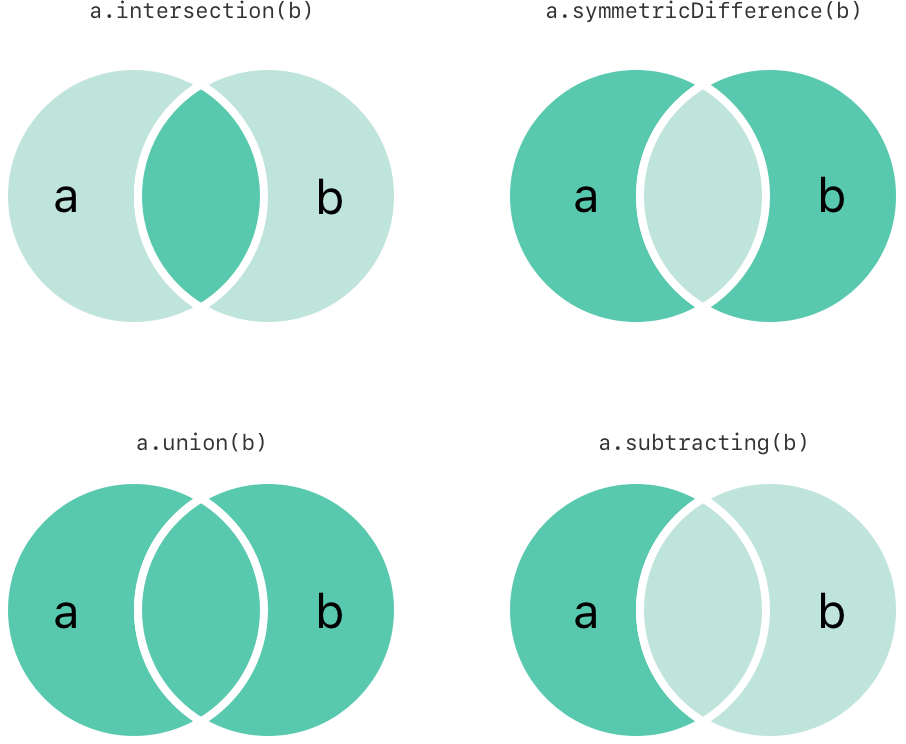
intersection(_:): 교집합으로 새로운 set 생성할 때symmetricDifference(_:): 교집합을 제외한 나머지 부분으로 새로운 set 생성할 때union(_:): 합집합으로 새로운 set 생성할 때subtracting(_:): 차집합으로 새로운 set 생성할 때
let oddDigits: Set = [1, 3, 5, 7, 9]
let evenDigits: Set = [0, 2, 4, 6, 8]
let singleDigitPrimeNumbers: Set = [2, 3, 5, 7]

oddDigits.union(evenDigits).sorted()
// [0, 1, 2, 3, 4, 5, 6, 7, 8, 9]
oddDigits.intersection(evenDigits).sorted()
// []
oddDigits.subtracting(singleDigitPrimeNumbers).sorted()
// [1, 9]
oddDigits.symmetricDifference(singleDigitPrimeNumbers).sorted()
// [1, 2, 9]
Set Membership and Equality
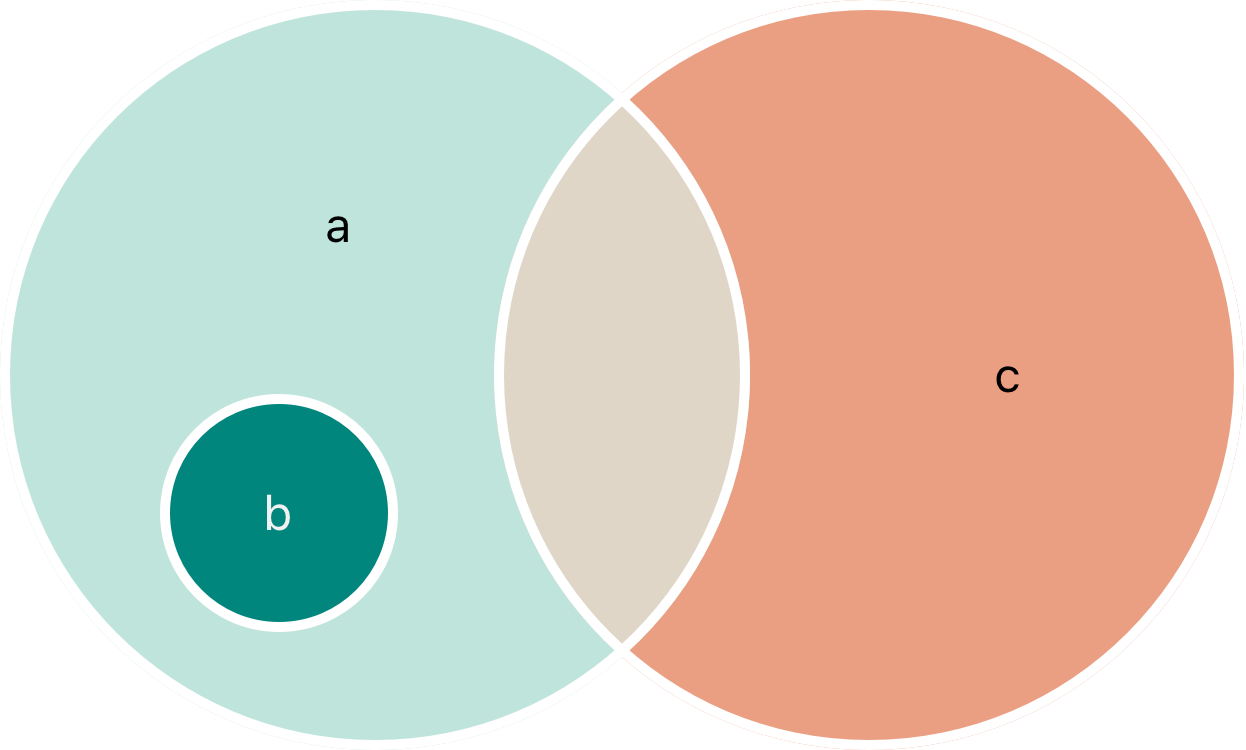
- 관계
a:b의 superset (모든b의 원소를 포함하고 있음)b:a의 subset (모든 원소가a에 포함되어 있음)b,c: disjoint with one another (교집합이 없음)
- is equal operator
==: 두 원소가 같은 값을 가졌는지 확인 isSubset(of:)isSuperset(of:)isStrictSubset(of:)/isStrictSuperset(of): subset 이거나 superset 이지만 동등하지는 않은지 확인isDisjoint(with:)
let houseAnimals: Set = ["🐶", "🐱"]
let farmAnimals: Set = ["🐮", "🐔", "🐑", "🐶", "🐱"]
let cityAnimals: Set = ["🐦", "🐭"]

houseAnimals.isSubset(of: farmAnimals)
// true
farmAnimals.isSuperset(of: houseAnimals)
// true
farmAnimals.isDisjoint(with: cityAnimals)
// true
Dictionaries
같은 타입의 key - 같은 타입의 value 를 순서 없이 collection 으로 저장해놓은 것. 모든 value 는 연관된 고유의 key 가 있음.
value 를 그들의 identifier(key) 로 찾아야 하는 경우 유용
Dictionary Type Shorthand Syntax
Dictionary<Key, Value> / [Key: Value]
Key 는 Hashable 프로토콜을 채택해야 함
Creating an Empty Dictionary
initializer 사용
var namesOfIntegers: [Int: String] = [:]
// namesOfIntegers is an empty [Int: String] dictionary

namesOfIntegers[16] = "sixteen"
// namesOfIntegers now contains 1 key-value pair

// context 가 이미 type 정보를 제공하고 있기 때문에 empty dictionary literal 을 사용
namesOfIntegers = [:]
// namesOfIntegers is once again an empty dictionary of type [Int: String]
Creating a Dictionary with a Dictionary Literal
Dictionary literal 사용 가능. 하나 이상의 key-value 쌍을 dictionary collection 으로 작성할 수 있게 해주는 간소화된 방법.
[<#key 1#>: <#value 1#>, <#key 2#>: <#value 2#>, <#key 3#>: <#value 3#>]

var airports: [String: String] = ["YYZ": "Toronto Pearson", "DUB": "Dublin"]

// key value 가 consistent 타입을 갖고 있기 때문에 아래와 같이 작성 가능
var airports = ["YYZ": "Toronto Pearson", "DUB": "Dublin"]
Accessing and Modifying a Dictionary
Method / property / subscript syntax 를 사용
count: 원소의 개수isEmpty:count== 0 인지 확인- subscript syntax : key 값을 전달해서 아이템에 접근
updateValue(_:forKey:): 특정 키에 대한 아이템 설정 / 업데이트. 키에 대한 값이 없는 경우 설정. 오래된 value 리턴. 새로 설정된 값인 경우nil리턴removeValue(forKey:): dictionary 에서 key-value 쌍 제거. 해당 값이 있었다면 제거된 value, 없었다면nil리턴
print("The airports dictionary contains \(airports.count) items.")
// Prints "The airports dictionary contains 2 items."

if airports.isEmpty {
    print("The airports dictionary is empty.")
} else {
    print("The airports dictionary isn't empty.")
}
// Prints "The airports dictionary isn't empty."

airports["LHR"] = "London"
// the airports dictionary now contains 3 items

airports["LHR"] = "London Heathrow"
// the value for "LHR" has been changed to "London Heathrow"

if let oldValue = airports.updateValue("Dublin Airport", forKey: "DUB") {
	print("The old value for DUB was \(oldValue).")
}
// Prints "The old value for DUB was Dublin."

if let airportName = airports["DUB"] {
    print("The name of the airport is \(airportName).")
} else {
    print("That airport isn't in the airports dictionary.")
}
// Prints "The name of the airport is Dublin Airport."

airports["APL"] = nil
// APL has now been removed from the dictionary

if let removedValue = airports.removeValue(forKey: "DUB") {
    print("The removed airport's name is \(removedValue).")
} else {
    print("The airports dictionary doesn't contain a value for DUB.")
}
// Prints "The removed airport's name is Dublin Airport."
Iterating Over a Dictionary
for-in loop 를 사용해서 key-value 쌍을 iterate 가능
keys, values 프로퍼티를 통해 key, value 에 접근 가능
for (airportCode, airportName) in airports {
    print("\(airportCode): \(airportName)")
}
// LHR: London Heathrow
// YYZ: Toronto Pearson

for airportCode in airports.keys {
    print("Airport code: \(airportCode)")
}
// Airport code: LHR
// Airport code: YYZ


for airportName in airports.values {
    print("Airport name: \(airportName)")
}
// Airport name: London Heathrow
// Airport name: Toronto Pearson